Ad Asset Directory
Designed and built an internal asset-management platform that gives marketing and operations teams one place to find, manage, and preserve content across multiple brand identities.
- Astro
- React
- TypeScript
- Tailwind CSS
- +2
Highlights
-
Designed an internal search and admin tool for marketing and operations teams managing multiple brands
-
Replaced scattered drive folders, bookmarks, and inconsistent naming with one searchable source of truth
-
Created multi-brand theming with reusable UI patterns and brand-specific portal surfaces
-
Built a non-technical admin workflow for managing brands, categories, metadata, tags, and asset links
-
Reduced asset lookup time from roughly 5-10 minutes to under 30 seconds
Context
The Ad Asset Directory is an internal product system for teams managing marketing assets across multiple brand identities. The work started from a common operational problem: the assets existed, but finding the right file at the right moment depended on memory, folder archaeology, and inconsistent naming.
I designed and built the tool myself so I could connect the product experience to the real implementation constraints: search performance, admin editing, brand theming, data fallback, and the amount of structure non-technical users would actually maintain.
Users And Stakeholders
The primary users were marketing and operations team members who needed fast access to graphics, documents, brand guides, packaging references, and shared links. Admin users needed to keep the system current without editing code or asking a developer to add links.
The stakeholder need was broader than storage. The product had to protect brand consistency, reduce onboarding friction, and make the “where is that asset?” question less dependent on one person’s memory.
Before State
Before the directory, assets were spread across Google Drive folders, Dropbox, bookmarks, and team knowledge. Each brand had different folder structures, naming patterns, and levels of documentation.
The pain points were concrete:
- Finding a specific file took roughly 5-10 minutes.
- New team members did not know which folder or tool to check first.
- Brand assets did not have one reliable source of truth.
- Existing storage tools did not provide useful cross-brand search.
- Updating asset links required too much informal coordination.
- Before
Assets lived in drive folders, Dropbox, bookmarks, and memory, with different naming rules per brand.
- Normalize
Brands, categories, links, descriptions, and tags became explicit product objects.
- Find
Users could browse by portal or search across title, description, brand, category, and tags.
- Maintain
Admins could edit brands, categories, and links without developer intervention.
The main product decision was to design around recall and maintenance, not only presentation.
Product Decisions
Centralized IA. I made brands, categories, links, tags, and metadata explicit so assets could be found through structure or search. This turned a storage problem into an information-architecture problem.
Multi-brand theming. Each brand needed to feel distinct without requiring a separate codebase. I used CSS custom properties so portals could inherit one reusable UI system while applying brand-specific colors.
Client-side fuzzy search. The dataset was small enough to search in the browser, so client-side Fuse.js removed server latency and kept the interaction immediate. Weighted fields prioritized titles first, then descriptions, brand, category, and tags.
Admin self-service. The tool needed to stay useful after launch. I built admin CRUD workflows and inline editing so non-technical users could manage the directory without developer handoff.
Interaction Details
The search experience is the product’s center of gravity. It supports both broad recall and focused filtering:
Cmd+Kopens search quickly.- Arrow keys move through results.
- Weighted search handles imperfect memory.
!brandfilters by brand.#categoryfilters by category.- Cached and debounced queries keep results responsive.
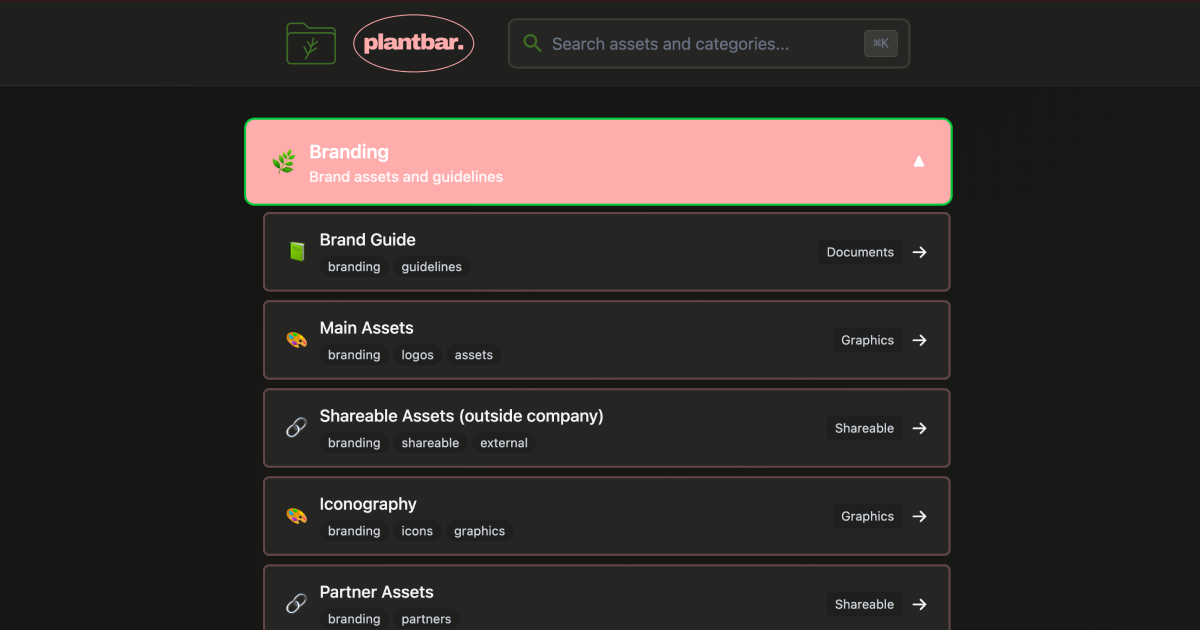
The admin workflow is intentionally direct. Admins can create brands, choose theme colors, organize categories, edit asset links, add metadata, and manage tags from the same system users browse.
Design System Angle
This project doubled as a practical design-system exercise. The interface needed to support multiple brand surfaces while staying maintainable for a small team. I treated brand colors, portal structure, category organization, and shared components as parts of one product system.
The theming model mattered because brand coherence was one of the user problems. A centralized asset tool would fail if it made every brand feel flattened or generic. The system needed enough consistency for usability and enough variation for brand recognition.
Implementation Constraints
I used Astro for the routing and static shell, React for interactive search/admin surfaces, Supabase for primary data persistence, and JSON files as a fallback. That fallback was a product decision as much as a technical one: the directory needed to remain usable even if the database was temporarily unavailable.
Search performance stayed under 100ms because the index is prebuilt, cached, debounced, and small enough to run locally. That immediacy is what made the tool feel materially better than digging through folders.
Outcome
The finished system delivered measurable operational improvements:
- 90% reduction in asset lookup time, from roughly 5-10 minutes to under 30 seconds.
- Sub-100ms search responses.
- Zero-training onboarding for new team members.
- Self-service admin updates for brands, categories, and links.
- Stronger brand consistency through centralized assets and themed portals.
What I Learned
Internal tools are product design work when they change how a team operates. The most important design choices were not decorative. They were decisions about information architecture, search behavior, admin responsibility, fallback resilience, and how much structure the team would maintain over time.