Ghosted
Designed and built an AI-assisted job application workspace — from a Go terminal prototype to a shipped web product where deterministic code does the work and one bounded model call writes the prose.
- Go
- Bubble Tea
- TypeScript
- Next.js
- +3
Highlights
-
Designed and built a working prototype for developers managing fragmented job-search workflows
-
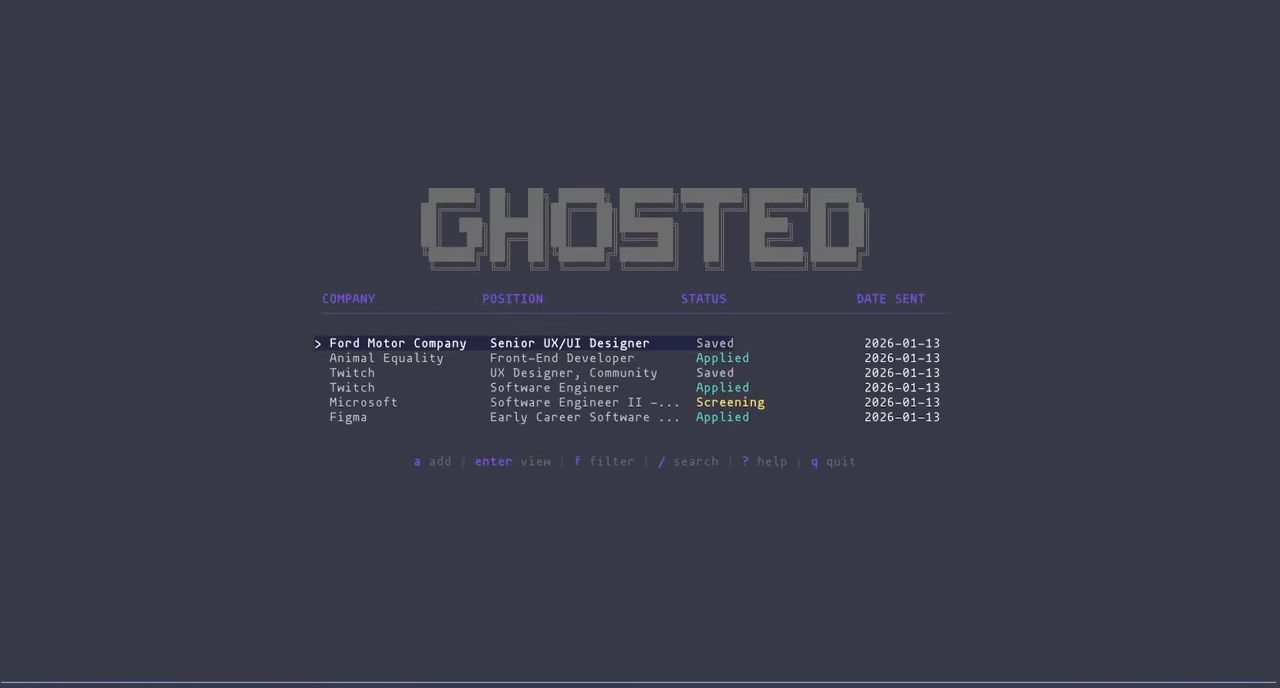
Created a keyboard-first TUI plus scriptable CLI so humans and AI agents could work from the same local data model
-
Modeled an 8-stage application pipeline with document links, interview details, contacts, and follow-up actions
-
Built JSON-based agent handoffs for parsing postings, generating documents, reviewing quality, and updating records
-
Used the project to study how product designers can reason more clearly with engineering constraints
-
Rewrote the prototype as a shipped web product — posting capture, deterministic fit scoring, one bounded generation call, triage review, and ATS-validated PDF export
-
Shipped to real testers on an invite-gated shared subscription, backed by 744 tests across a pure-TypeScript core and a Next.js app
Context
Ghosted began as a product-design exercise disguised as a terminal app. I wanted to understand the kind of tooling developers reach for when a workflow is repetitive, private, and spread across too many surfaces: job boards, notes, emails, resumes, cover letters, interviews, and follow-up reminders.
Rather than sketching the concept only in Figma, I built a working prototype in Go. That forced the design decisions to collide with implementation details: state transitions, file formats, keyboard navigation, command naming, error tolerance, and the boundary between what an AI agent should automate and what a person should approve.
Problem
The modern job search is a high-volume workflow with low tolerance for losing context. A developer may save a posting in one browser tab, tailor a resume in another tool, track a recruiter in email, and remember follow-ups in a notes app. The more applications they manage, the more the real product problem becomes coordination.
I framed the problem around three jobs:
- Keep every application in one durable pipeline.
- Let the user move quickly without leaving the keyboard.
- Use AI to reduce repetitive document and parsing work without removing human control.
My Role
I designed and built Ghosted myself. That matters to the story: the goal was not only to ship an app, but to become a better bridge between product design and engineering by feeling the constraints directly.
I owned the workflow model, terminal interaction design, command interface, data structure, document pipeline, and AI-assisted development process. Claude Code acted as a coding collaborator, but I made the product decisions: what state needed to exist, what should stay local, where automation should stop, and how much control the user needed before generated materials became part of the tracker.
Design Constraints
- Local-first data: Job-search data can be private and messy, so the first version uses plain JSON files instead of a hosted account system.
- Keyboard-first UX: The primary user is comfortable in a terminal, so navigation and status changes needed to be fast without feeling cryptic.
- Scriptable automation: The CLI accepts and returns JSON so AI agents and shell scripts can work against the same model as the TUI.
- Human review: AI can parse, draft, and score documents, but the product needed dry-run and approval paths before automation updates the tracker.
- Portable documents: Resume and cover-letter outputs needed predictable naming so files could be reviewed, opened, and attached later.
- Saved
A role is captured for later review before the user commits to applying.
- Applied
The submitted role becomes part of the active pipeline with document links.
- Screening
The application has moved into initial recruiter or company review.
- Interview
The detail view tracks interview type, date, contacts, and notes.
- Offer
The opportunity is separated from ordinary active applications.
- Accepted / closed
The pipeline preserves final outcomes, including rejected and withdrawn states.
The state model made the product feel more like a recruiting workflow than a to-do list.
Key Product Decisions
TUI plus CLI, not one interface. The TUI is for review, browsing, and daily updates. The CLI is for automation, scripts, and AI agents. Both share the same JSON store, which kept the prototype simple while still supporting two very different interaction modes.
JSON as the product contract. I chose a plain data format because it made the tool inspectable, version-controllable, and agent-ready. It also helped me reason about the boundary between interface design and underlying product state.
Eight pipeline stages. The model needed enough fidelity to match a real hiring process without becoming a project-management system. The stages are explicit enough for reporting and quick updates, but simple enough to move through with number keys.
Review before automation. The agent pipeline supports dry runs and approval flags because document generation is high leverage but easy to get wrong. I wanted AI to accelerate the repetitive parts, not silently alter the user’s source of truth.
Interaction Details
The interaction model is intentionally small:
- Arrow keys and vim-style movement support quick scanning.
- Number keys update an application’s stage without opening a form.
ustarts from a job posting URL and moves into the fetch/apply workflow.oopens the document folder for the selected application.- Detail views expose salary, contacts, interviews, document links, notes, and follow-ups without overwhelming the list view.
AI Workflow
- Fetch posting
The user provides a URL or saved posting, then Ghosted stores a local markdown reference.
- Parse role
An agent extracts company, role, location, compensation, and requirements into structured data.
- Generate drafts
Resume and cover-letter agents create tailored Typst documents for the selected role.
- Review quality
A review agent scores outputs and flags weak documents before they are accepted.
- Approve update
The user can dry-run, revise, or auto-approve before the tracker is changed.
- Compile files
Typst outputs become predictably named PDFs linked back to the application.
The key design question was not 'can AI do this?' It was 'where should the human stay in control?'
The agent pipeline includes four roles:
- Posting Parser extracts structured information from job descriptions.
- Resume Agent drafts a tailored resume based on the role.
- Cover Letter Agent drafts a targeted cover letter.
- Review Agent scores the documents and provides feedback before approval.
Building With Claude Code
Claude Code helped accelerate the implementation, but the collaboration worked best when I gave it product constraints instead of vague build requests. The most useful loops were around the data model, Bubble Tea view architecture, CLI command structure, documentation, and agent handoffs.
That process changed how I think about AI-assisted design work. The value was not simply speed. It was being able to explore implementation constraints while keeping enough product judgment to reject, simplify, or redirect the generated code.
Outcome And Learning
Ghosted shipped as an open-source working prototype. More importantly, it gave me a concrete model for designing AI-assisted tools:
- Shared data contracts matter more than flashy automation.
- Keyboard UX is only good when the underlying state model is clear.
- AI workflows need visible review points, failure tolerance, and user control.
- Building the prototype myself made the design tradeoffs more honest.
The next validation step would be testing the workflow with other technical job seekers: where they hesitate, what they trust, what feels too automated, and which parts of the pipeline are worth turning into a more polished product surface.
Roadmap
- Add a proactive assistant for stale applications, follow-up timing, and outreach drafts.
- Improve document attachment and audit trails inside the TUI.
- Add stronger failure states for missing job-board data, weak generated documents, and ambiguous company metadata.
- Explore a visual companion surface for users who want the workflow model without living entirely in the terminal.
From Prototype To Product
Everything above is where the terminal prototype stopped, and the last item on that roadmap — a visual surface for people who do not live in the terminal — is where the second act starts. In June 2026 I rewrote Ghosted as a web product. The rewrite began the way the prototype did: with a structured decision interview before any code, this time to settle what deserved to survive the change of medium.
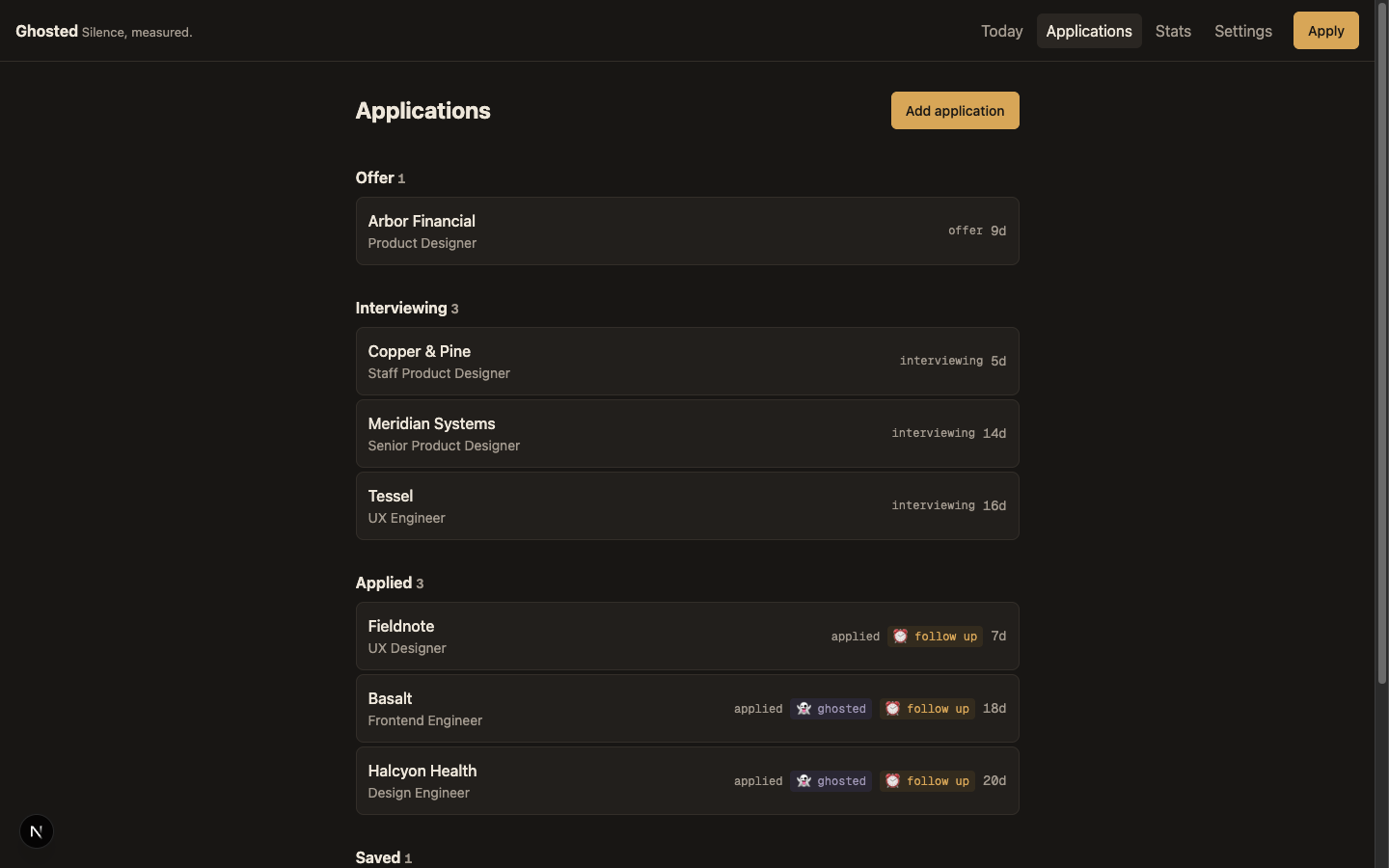
The interview sorted the product into three piles. What stayed: the tracking discipline and the derived statuses — “ghosted” and “needs follow-up” are computed from events, never stored. What died: the TUI itself, and with it the assumption that the user is someone like me. What was genuinely new: the apply flow, the work that happens between “I found a posting” and “I applied.”
The plan also recorded a reversal worth being honest about. The v2 plan’s non-goals list opened with “Resume/cover letter generation, AI agents, or ATS checking.” That non-goal lasted days. A tracker alone is a spreadsheet with opinions; the differentiator turned out to be the pair — tracking and applying in one place, each keeping the other honest. I reversed a written plan and kept the receipt in the repo docs.
The TUI had proved the workflow model. It could not prove the product, because nobody else could use it.
Minimum Viable Intelligence
Early architecture sketches reached for an agent SDK, a headless CMS, and a hosted database. All three got cut — not because those tools are wrong (a headless CMS is exactly the right spine for my content-platform work), but because this product hadn’t earned them yet. The principle that replaced them fits in one sentence: deterministic code does everything it can, the model only writes prose, and code validates the model. I started calling it minimum viable intelligence — the least model the product can get away with, not the most it can absorb.
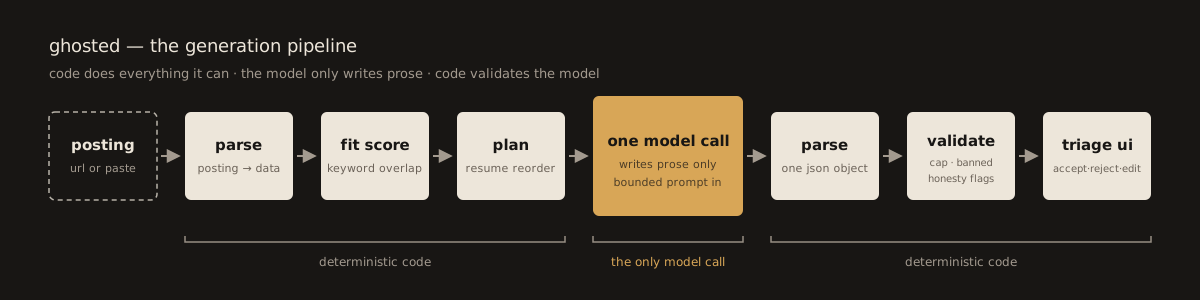
Code parses the posting, extracts keywords against a per-field lexicon, scores fit from keyword coverage, role match, and logistics, and plans the resume reorder. Only then does the model get involved, and only once: one bounded prompt in, one JSON object out. The model writes the cover letter, a summary line, bullet rewrites, opportunity angles, standout suggestions, and answers to application questions. Nothing else.
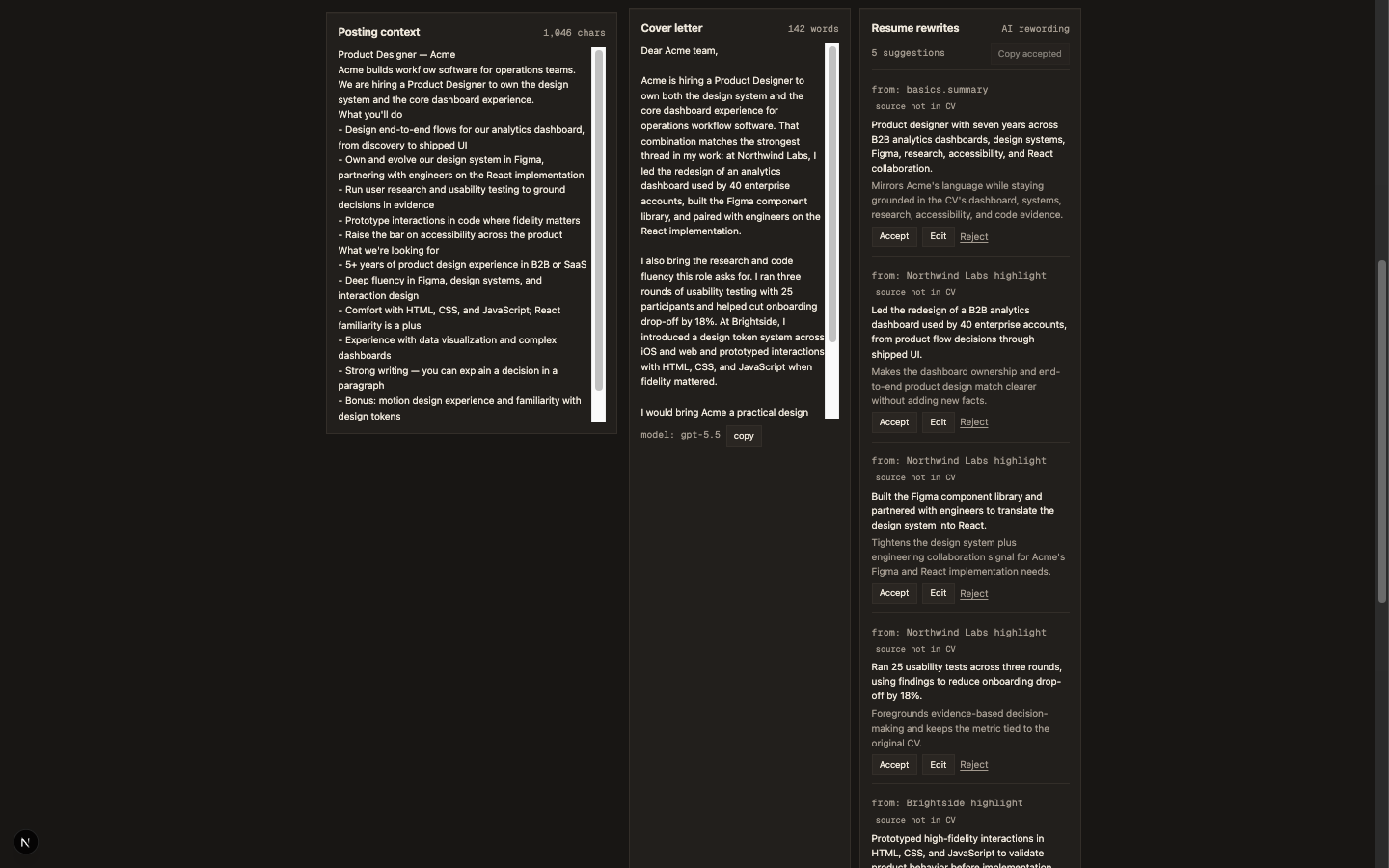
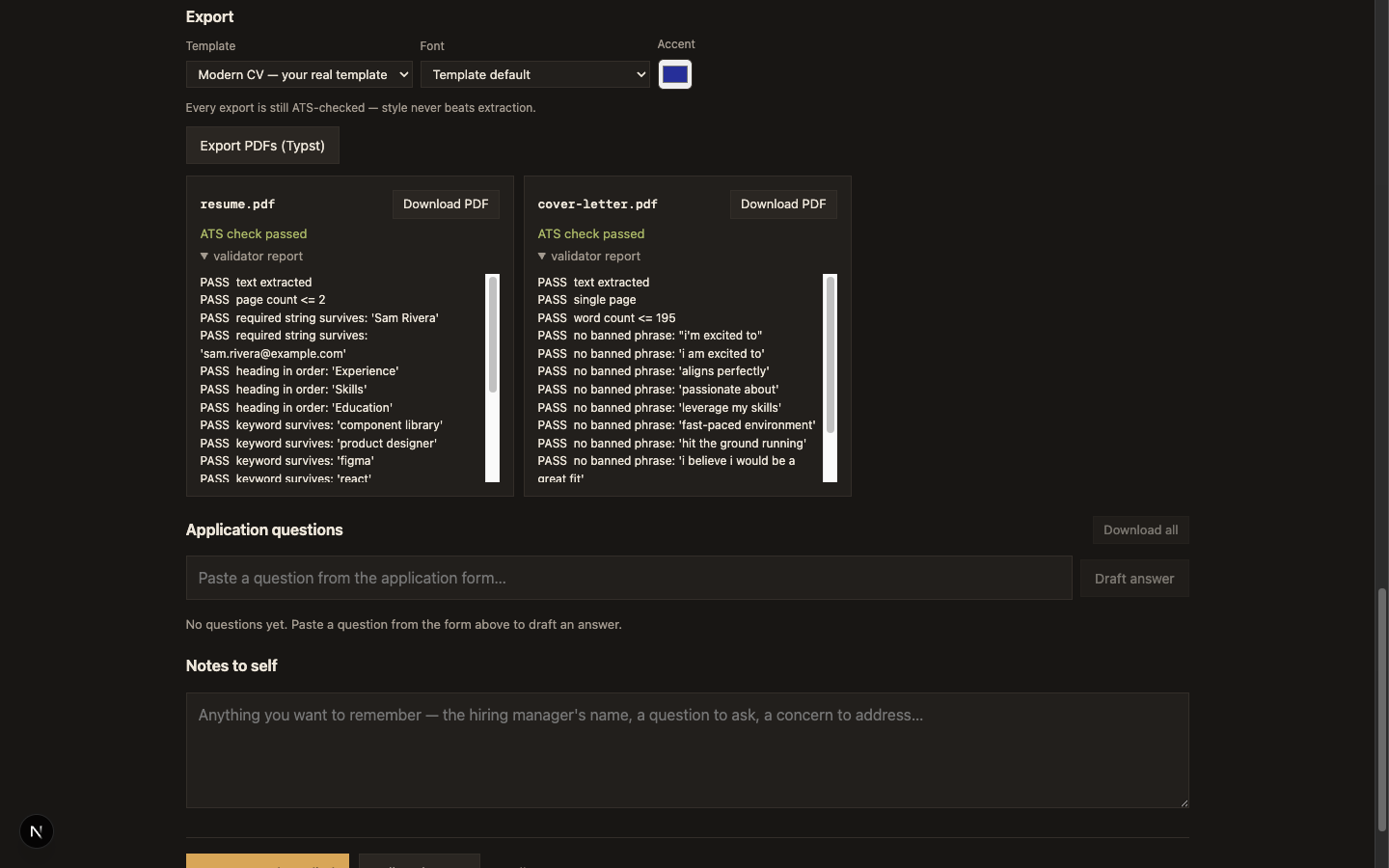
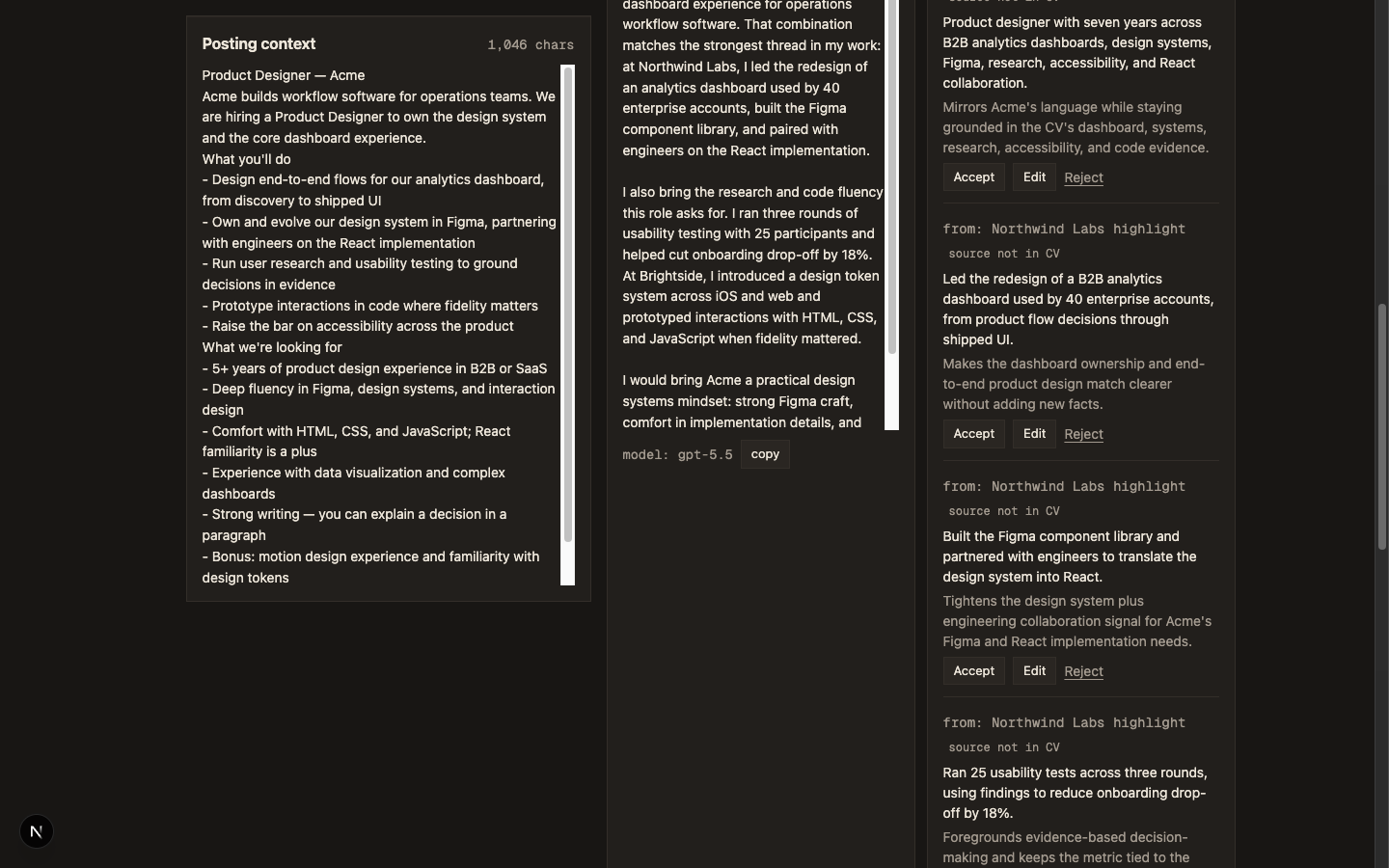
Then code checks the model’s work. The cover letter has a hard 180-word cap. A banned-phrase list catches the clichés models reach for under pressure — “I’m excited to,” “aligns perfectly,” “passionate about.” Honesty flags compare every suggested rewrite against the CV and catch numbers and tools that appear nowhere in it. A flagged suggestion is not silently deleted; it gets a “source not in CV” chip, and the workspace counts the items that “need your judgment — the model could not ground them in your CV.” The user decides.
There is no chat. Revisions are targeted: “make it warmer” sends one focused prompt that may change only the cover letter and returns only the cover letter. Everything else is untouched — not by convention, by construction.
The Apply Flow
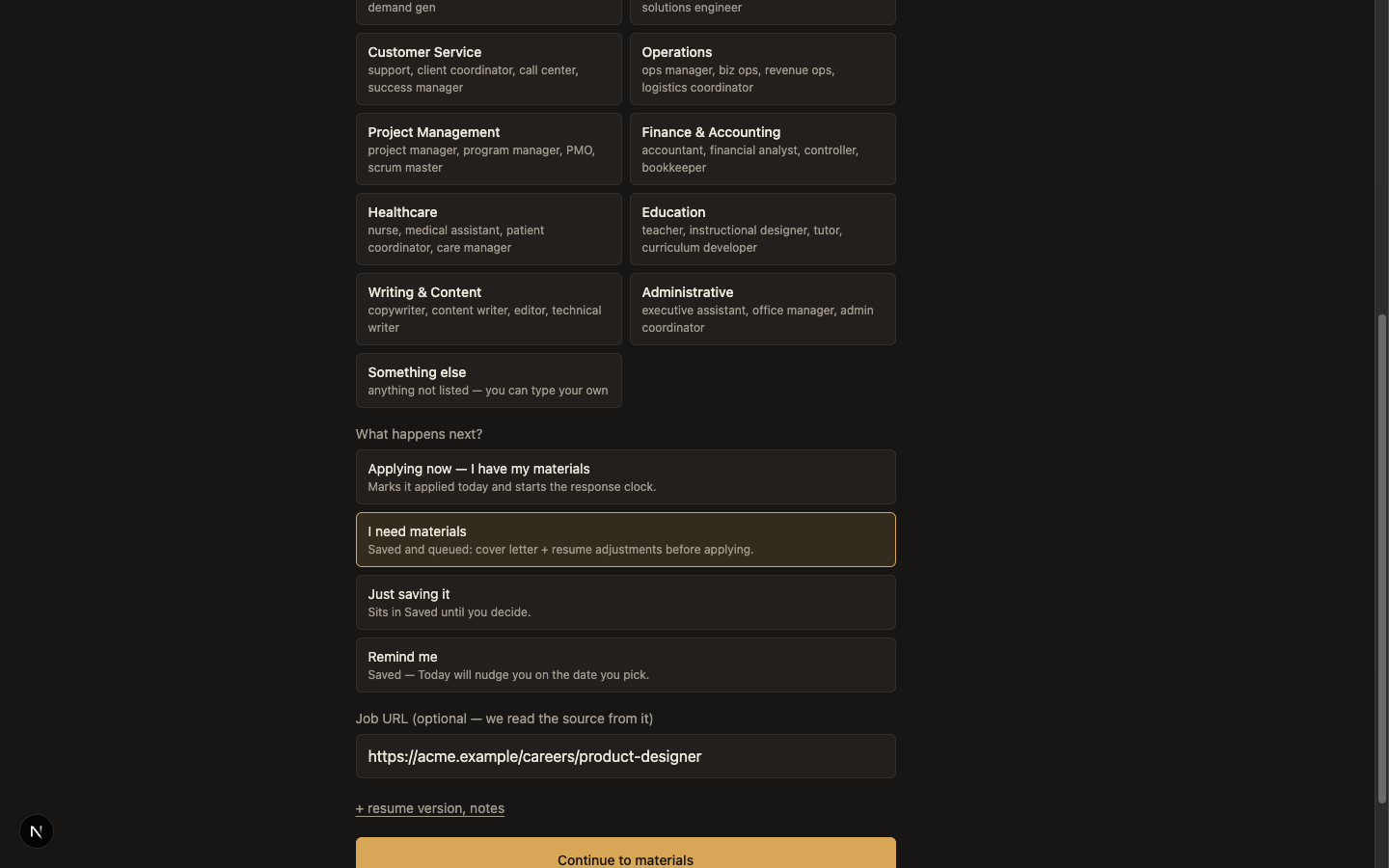
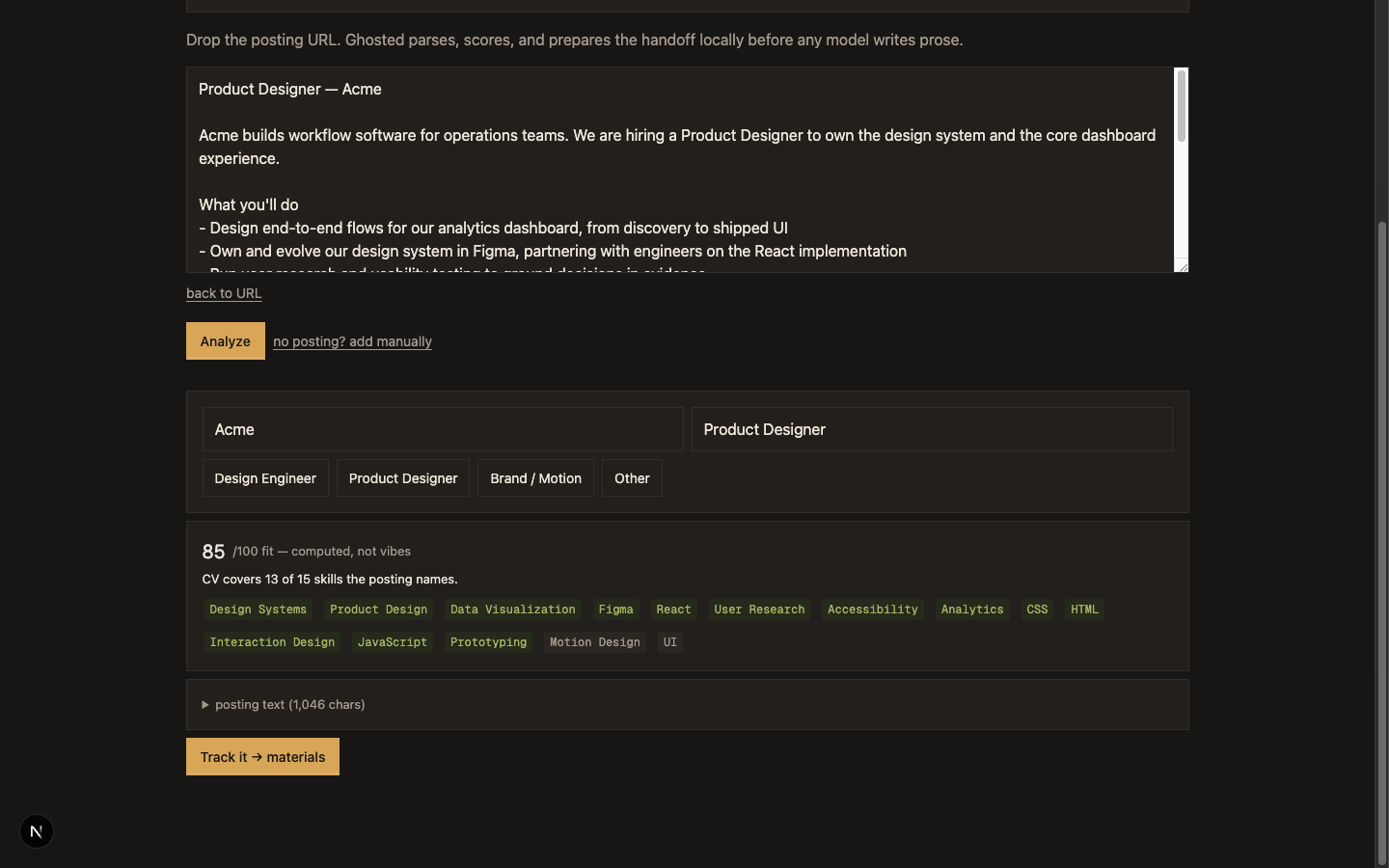
Capture starts with a posting URL and one question: what happens next — already applied, generate materials, or remind me later. The answer decides the status, the events, and whether the apply workspace opens. The fit card scores the match out of 100 and shows its work: matched keywords as chips, missing ones beside them. The card’s own caption states the position: “/100 fit — computed, not vibes.”
Generate fills the materials workspace: the cover letter, the summary line, resume rewrites, opportunity angles, and standout moves — everything the one call returned, laid out for review rather than pasted anywhere.
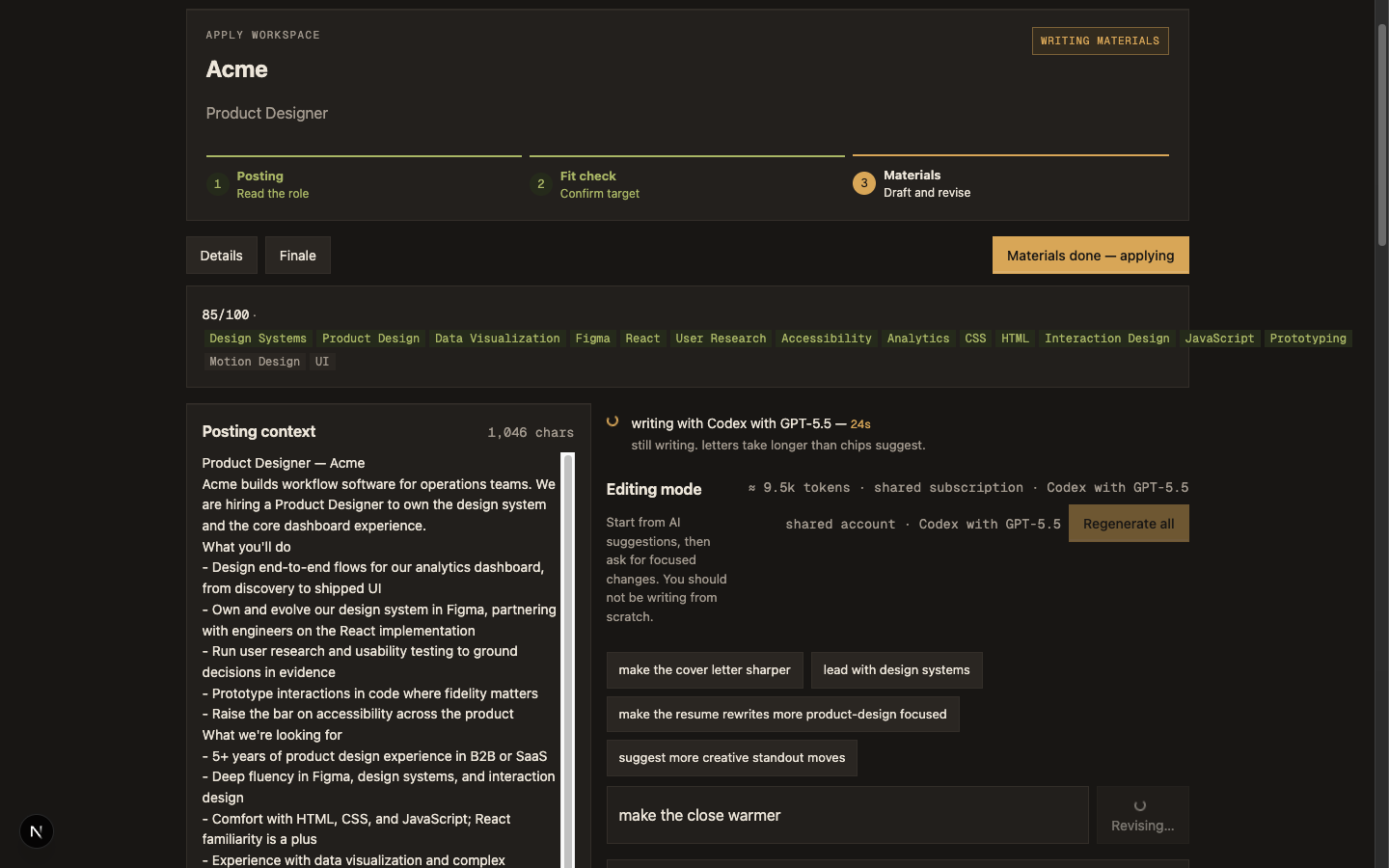
While that call runs, the status line reports only what is actually true. “assembling the prompt — cv, posting, fit,” then “writing with Codex with GPT-5.5 — 23s” with a timer and a dry sub-line (“still writing. letters take longer than chips suggest.”), then “checking the draft — word cap, banned phrases, honesty flags.” The CLI backing the shared account cannot stream partial output, so there is no percentage to show — and the UI declines to invent one. If you do not know the progress, do not draw a progress bar.
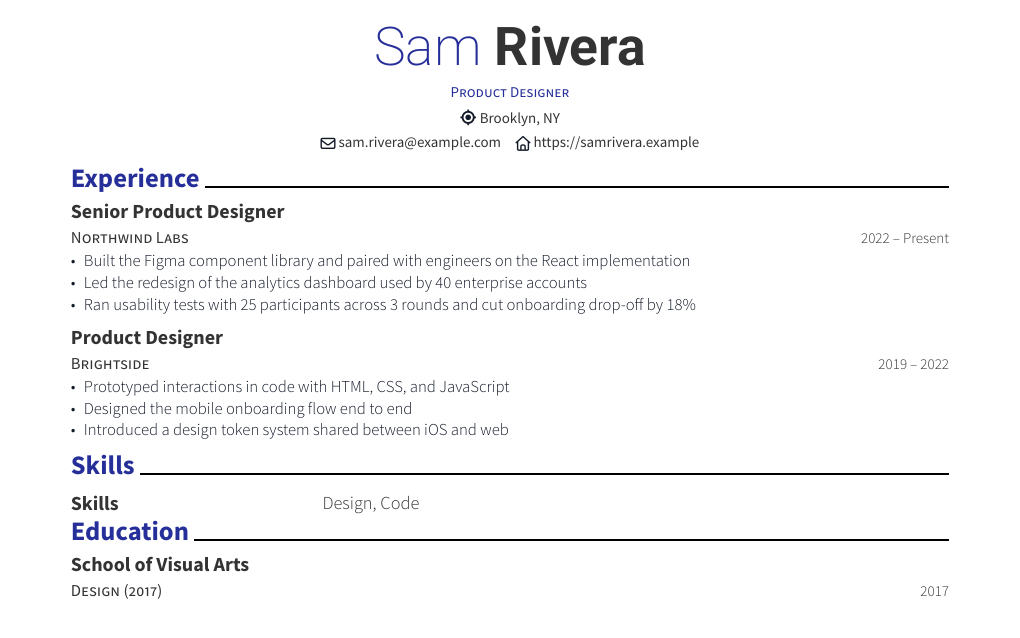
Export compiles the resume and letter to PDF through Typst’s modern-cv template, then validates its own output: it re-extracts the text with pdftotext and asserts that names, headings, dates, and the matched keywords survived. The premise, straight from the validator’s docstring: an ATS doesn’t read your beautiful PDF, it reads the text it can extract from it.
- Capture
A posting URL plus one fork — applied already, generate materials, or remind me later.
- Fit
Deterministic parse and keyword overlap produce a 0–100 score with matched and missing chips.
- Generate
One bounded model call returns letter, summary, rewrites, angles, and standout moves as JSON.
- Triage
Each suggestion is accepted, rejected, or edited. Honesty flags mark what the model may have invented.
- Export
Typst compiles the PDFs; the ATS validator re-extracts the text and asserts nothing was lost.
- Applied
The tracker takes over: events, follow-ups, and the documents hub.
Every stage is code except one — and that one is bounded on the way in and validated on the way out.
Onboarding earns the flow its inputs: build a CV from a short interview, upload an existing PDF (text extraction first, a vision fallback for image-only files), or paste a JSON Resume. Three doors into the same baseline.
Where The Human Stays In Control
Act one ended on a question — not “can AI do this?” but “where should the human stay in control?” The web product is the production answer.
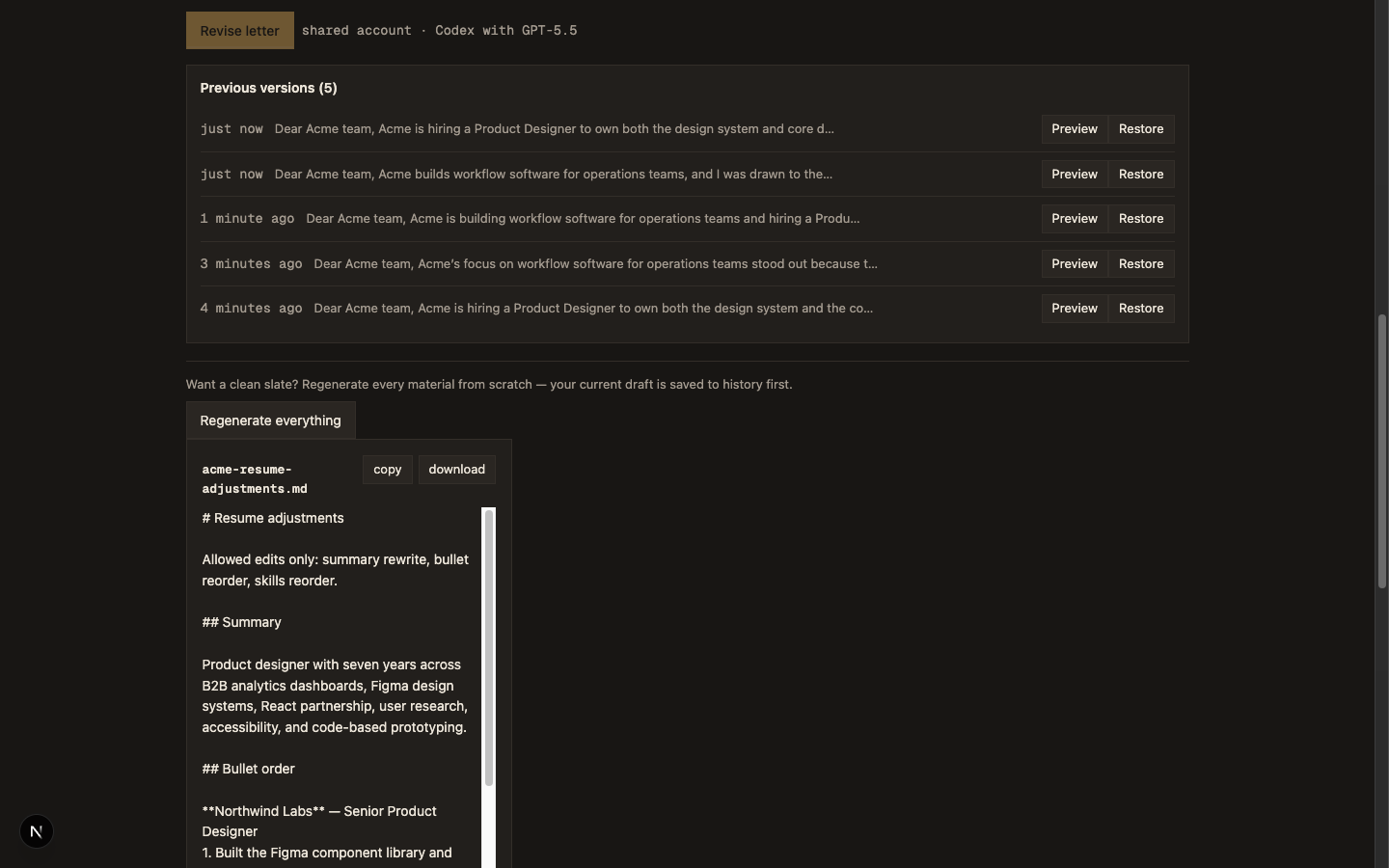
Rewrites arrive as triage, one decision at a time: accept, reject, or edit. Nothing pastes over the resume wholesale. Honesty flags surface rather than filter — the user sees what tripped the check and rules on it. Revision is targeted instead of regenerative, so approving one paragraph never risks the others. And every generation lands in draft history — a “Previous versions” list with preview and restore — so no draft the user liked is ever the cost of trying again.
Shipping On A Subscription
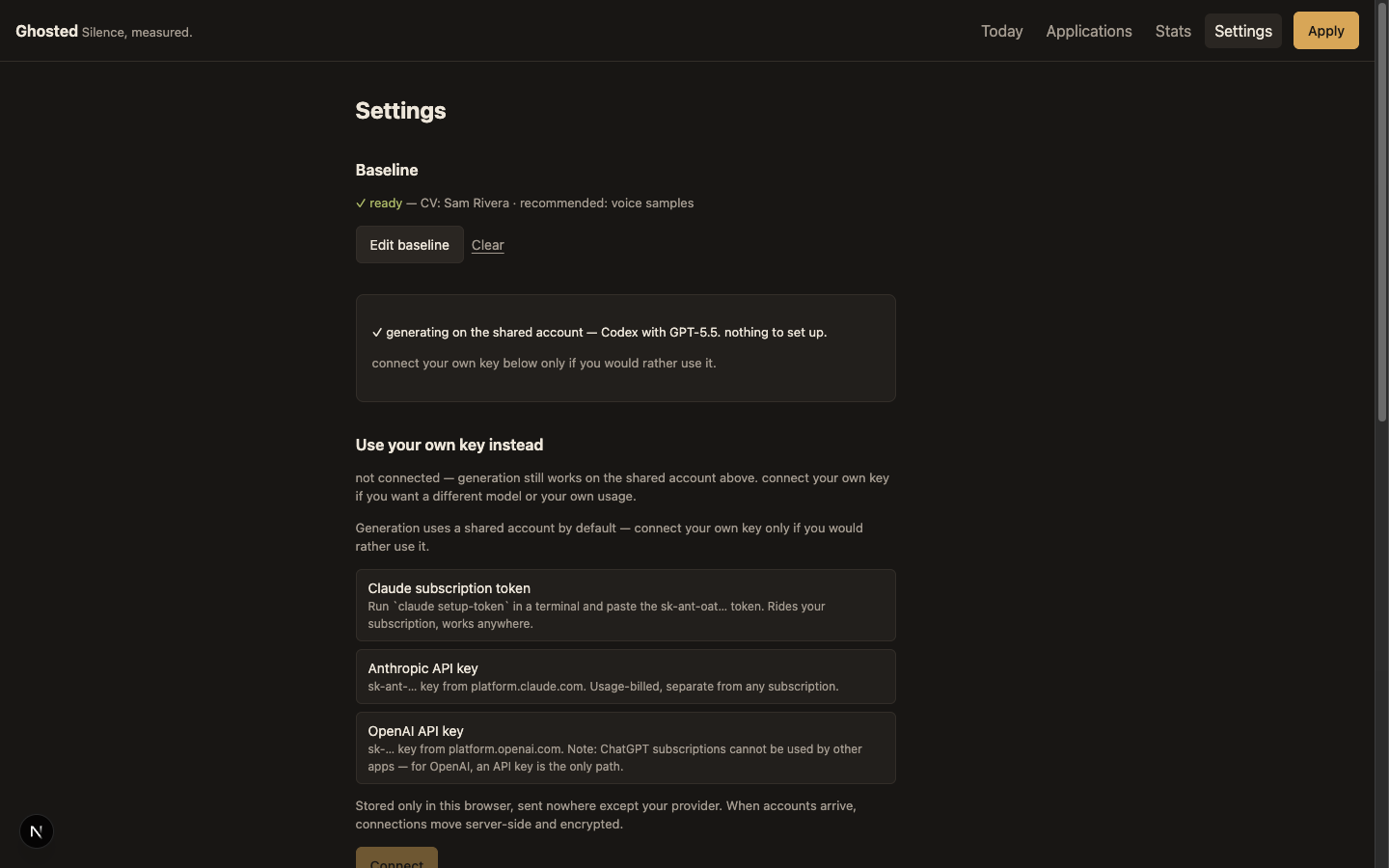
The testers I wanted include people who have never seen an API key, so the deploy generates on a house account: the server runs the owner’s own coding-agent subscription behind an invite gate and a daily cap. Getting there produced the best engineering lessons in the project.
The first attempt piped the generation prompt to the Claude CLI. It failed in a way I did not predict: the CLI is a full agent, and it refused the app’s own prompt as a suspected prompt injection — then hung loading MCP servers until the 240-second timeout killed it. The same prompt through codex exec returned clean JSON in seconds. An agent CLI and a text-completion API are different species; the agent has opinions.
So the shared account pivoted to Codex. The CLI is installed in the Docker image and its ChatGPT login is seeded from a base64 secret into a persistent volume at container start. Two bugs only existed in the container: Typst package downloads (the template’s packages must be pre-cached at image build, because the container cannot fetch at runtime) and codex refusing to run outside a git repository — fixed with one flag, --skip-git-repo-check.
One security hole got caught before it bit. Once codex existed in the image, the models API advertised it to every visitor — and a visitor bringing their own key could have routed generations through the owner’s subscription, uncapped. The fix is server-side and absolute: server CLIs are never a bring-your-own-key offer.
Outcome And Feedback
Ghosted is live at ghosted.cello.design, invite-gated, running real generations for real testers. Storage is per-device localStorage behind repository interfaces — chosen over accounts to get testers in fast, with a server backend able to swap in later without touching product code.
Testing fed the product directly. A partner’s double-click silently swallowed her action, and became a synchronous double-fire guard in the shared button component. An overwide layout got dialed in. Regenerate-everything gave way to targeted revision. And a non-designer tester forced the product past its design-and-engineering assumptions: role types are now fifteen presets with per-field keyword lexicons, the fifteenth being “Something else” — type your own.
The numbers are measured, not estimated: a pnpm monorepo where the core logic is pure TypeScript with 332 tests and the Next.js app carries 412 more — 744 total, all passing. The voice stayed deadpan. The tagline is “Silence, measured.”
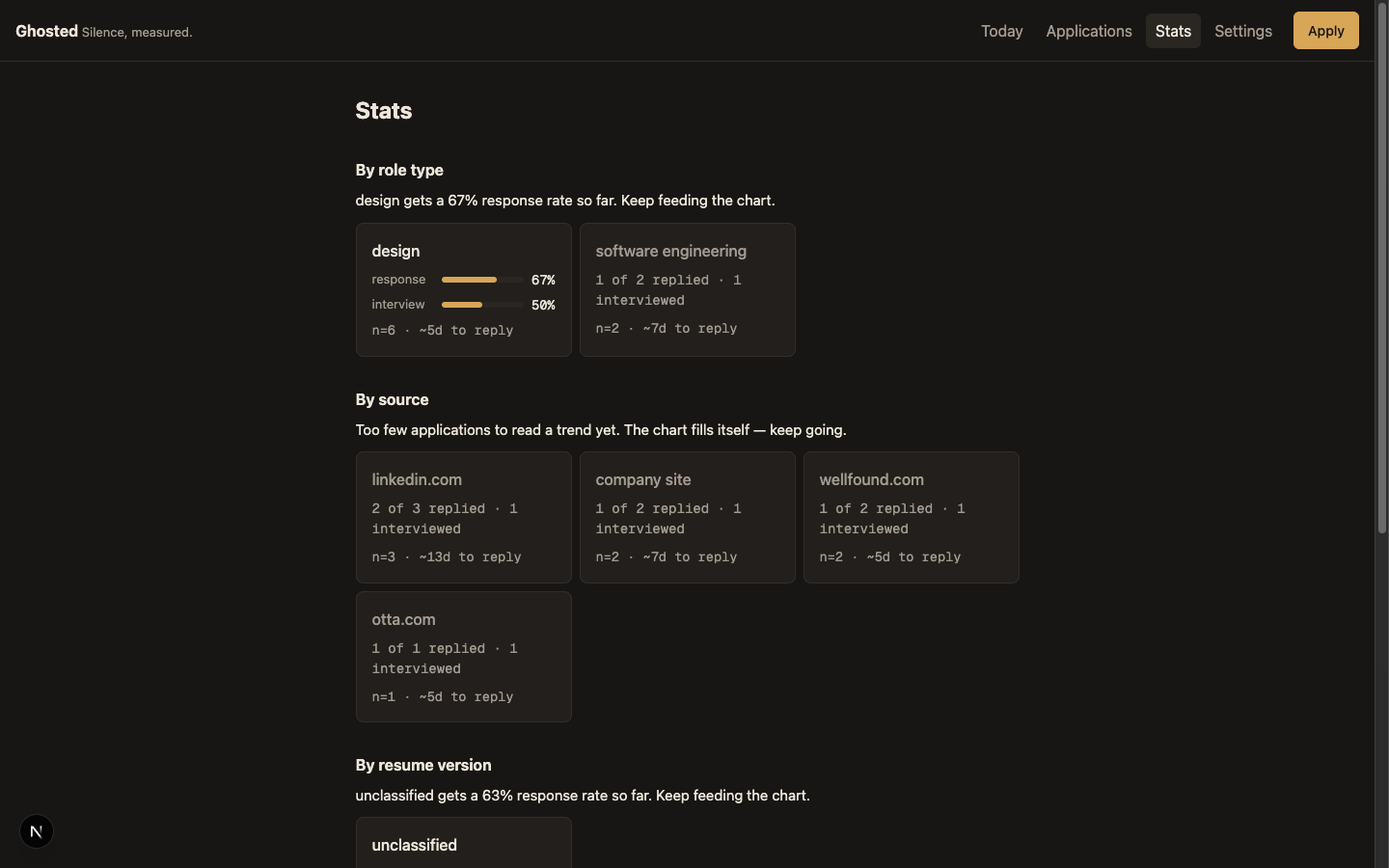
Roadmap (Updated)
All three of these are in planning, not shipped:
- Accounts and a server backend, swapping in behind the existing repository interfaces. Per-device storage was the right trade for speed to testers; it is the wrong one for following a job search across devices.
- UX telemetry with an owner annotation mode, so tester friction becomes data instead of anecdote.
- Agent-editable UI extensions — act one’s scriptable-surface idea, pointed at the web product.