



October 11, 2026
Designing for the second user
I shipped Ghosted's walkthrough for an empty account. Then I thought about Kim, who already had a resume, three jobs and applications out.
Updated: October 14, 2026
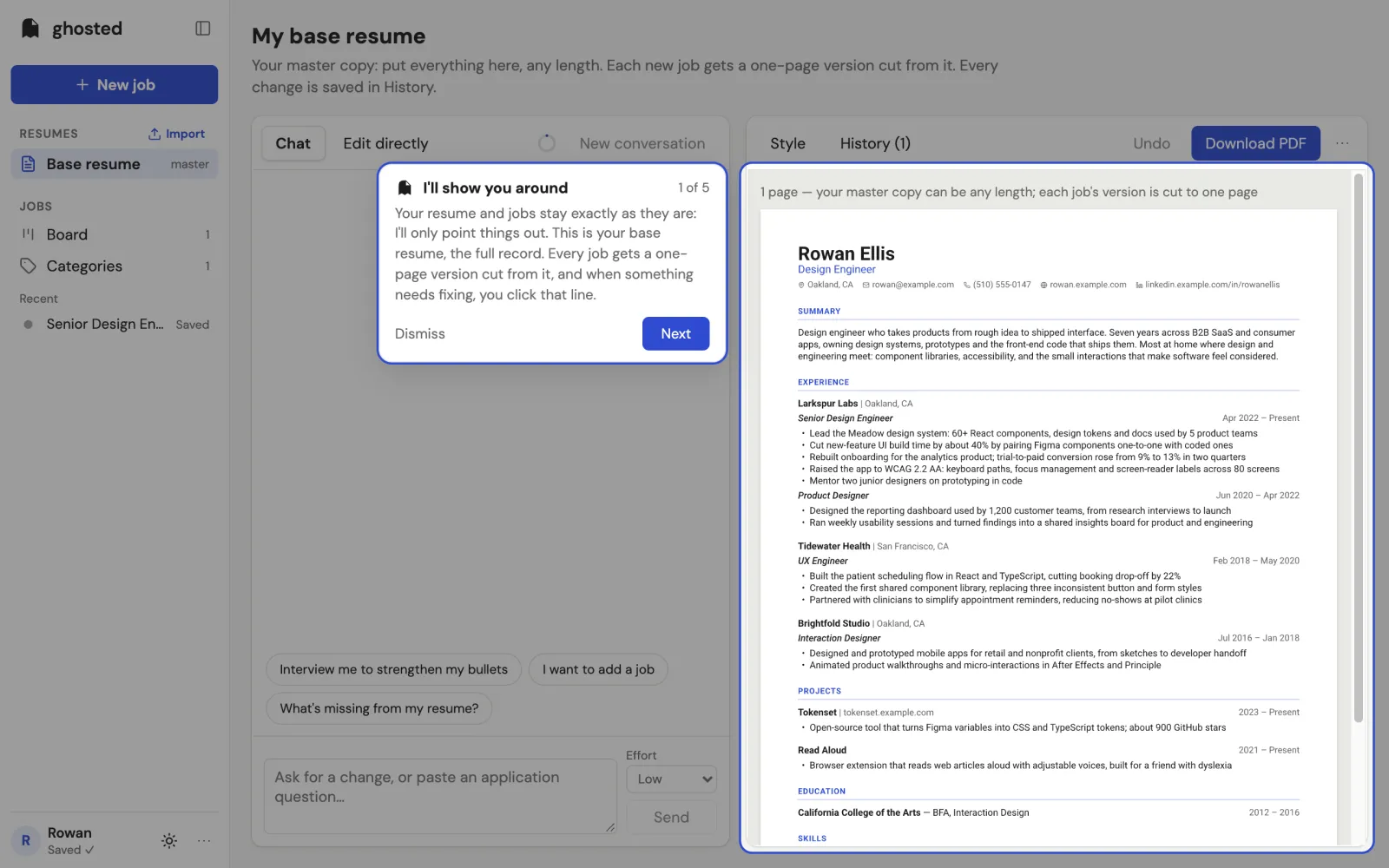
I shipped Ghosted’s new walkthrough thinking about someone opening an empty account. They’d have a few minutes to learn the app, try an edit, and add their first job. That was the person I had in mind for every onboarding flow I’d designed.
Then, the same evening, I thought about Kim.
Kim was one of Ghosted’s first testers. She already had a base resume, three jobs and applications out. What would happen if the tour asked her to practice on all of that?
Learning by doing
I wanted the ghost to explain things while trusting your intelligence. Adobe’s hands-on tutorials and Logic’s first run were references I kept coming back to. You learn in the actual app, with the thing you’re going to use.
So Ghosted’s tour dims the screen around one control. A blue ring shows where to look, and the ghost explains it from a card beside it. Every step has Next and Dismiss. Doing the thing also moves you forward.
The first version had nine steps. You clicked a line on your base resume to open its edit form, asked the chat for a change, then opened New job and pasted a link. After tailoring, you’d review the yellow highlights and keep or reject the AI’s proposal. The job’s own resume, Fit checklist and Research tab came after that.
On an empty account, those were useful things to try. On Kim’s account, they were changes to work she was already using.
What would happen to her work?
I asked Claude, which builds Ghosted with me, what the tour would do to Kim’s resume and applications. Its first answer was reassuring: the tour never changes anything by itself. She still has to edit, tailor or press Keep.
I wasn’t reassured. If I ask someone to make an edit as part of a tour, I need to think about what that edit does.
A practice change to Kim’s base resume would flag all three of her jobs with “Your base resume changed.” That includes jobs she’d already applied to. A practice job would leave a fake application on her board. Tailoring it would run an AI request she didn’t need.
There was also a strange case if she left halfway through. Pressing Next past Tailor left the tour waiting for her next AI proposal. If she asked for a real change days later, a “6 of 9” card could pop up in the middle of it. By then, she might have forgotten the tour existed.
The flow made sense for the person I’d pictured. I hadn’t thought enough about the person who was already there.
Show her around her own work
I considered a sandbox with a sample resume. That would keep her work safe, but she’d be learning on someone else’s information, and the sample would need cleaning up afterward.
I could also keep the hands-on tour and trust her to undo the practice changes. I didn’t like asking someone who already had applications out to do that cleanup.
Instead, I made the tour explain things for accounts that already have jobs. The spotlights stay, but “try this” becomes “here’s how.” There’s nothing she needs to change. Rather than asking her to add and tailor a job, it opens her most recent one and shows her the relevant parts.
That first revision took her tour from nine steps to seven. No practice edits, no extra job, and no tailoring run she didn’t need.
One thing did need filling in
Kim’s jobs were older than Fit and Research. If the tour pointed at those tabs as they were, she’d find them empty.
I made an exception for that. When the tour opens a job without a Fit report or research, it generates them as the job opens. That takes about 15 seconds, so they’re ready by the time the tour reaches them.
It’s an AI request started by taking the tour. I’m comfortable with that choice because it gives her something useful on an existing job. I still want to be clear about the distinction: the tour leaves her resume and applications alone, and fills in those missing reports.
Say what it will do
Kim also needed to know this before deciding to take the tour. I couldn’t expect her to discover that her work was safe by going through it.
So I put the promise in the one-time offer, the first card, and the What’s new entry. The offer says, “It only points things out: nothing in it changes your work.” The first card says, “Your resume and jobs stay exactly as they are: I’ll only point things out.”
I also gave an unfinished tour an end. If it’s been waiting more than a day, it closes quietly on the next load. You can replay it from the menu whenever you want.
Could it be shorter?
Later, I asked whether the steps covered what mattered and whether any could be combined. Then I asked for it shorter again, with an honest answer if we’d gone as far as we could.
The first two steps both pointed at the resume page. Clicking it in the first step already skipped the second, so I combined them. The explanation that each job has its own resume was already on the page; it became a sentence in the proposal card.
Fit and Research each took two clicks: open the tab, then read the explanation. Now one step points at both, and each tab explains itself when you open it.
The bigger omission was the ending. The tour stopped at Research, before sending the application. I added “Send it”: download the PDF, ask for a cover letter and answers, then mark the job Applied so Ghosted can nudge you if they go quiet.
That left seven steps for a new account and five for someone with jobs already. I couldn’t see another step to remove without hiding something people needed: editing the resume, chatting, finding New job on a phone, pasting a link, reviewing the first yellow proposal, and sending.
What I’ll ask next time
I keep coming back to three questions. What does this step actually write? What happens if someone leaves halfway? And what work do they already have here?
Those questions would have helped me earlier. Kim’s own work was a useful way to show her the app. I just needed to stop asking her to practice changing it.
I made the decisions in this post by working through the questions one at a time. Claude Code wrote the code. The product’s AI is OpenAI’s GPT, running on my ChatGPT subscription. The case study has the fuller release story and the options I considered.
Ghosted is invite-only right now. If you’re job hunting and want to try it, tap Request an invite at ghosted.cello.design.