


Client · Since January 2022 · Product Design Lead / Design Engineer
Asheville Dispensary
Bringing Asheville Dispensary, Plantbar and Nightshade into a shared design system while keeping each brand distinct across social, web, print and packaging.
- The problem
- Three distinct brands needed a coherent system across social, web, print and packaging.
- The decision
- Share the foundations and reusable structures, with each brand supplying its own visual identity.
- What changed
- A shared asset directory is in use; audits and editable guides are extending the system across media.
My role. Design lead since January 2022. I design the work, reconcile the sources and decide what the brands share, what stays distinct and how people can reuse it.
A family of brands, each with its own identity
I lead design for Asheville Dispensary, Plantbar and Nightshade. They need different personalities, but they also need a practical way to produce the materials a retail business uses every day.
That work moves between social posts, websites, event announcements, packaging, signage and presentations. A brand guide alone doesn’t connect all those places. The decisions need to survive in the files, templates and tools people actually use.
My approach is to share the foundations and reusable structures, then let each brand supply its own styling. The work is deciding which differences belong to the brand and which ones make the system harder to use.
Start with the work that already exists
The current audit brings together existing Figma sources, guides, websites, local artwork and Canva templates. These sources carry real decisions, but they don’t always agree.
A color in a guide may differ from a live page. A typeface in an older template may belong to an earlier direction. A supplier’s product identity may need to remain intact inside distributor material.
I’m treating those as decisions to resolve. The audit records the source, the mismatch, whether the difference is deliberate, and what needs approval before it becomes a rule.
Asheville Dispensary’s forest-green identity is the baseline for its current guide. Plantbar’s work keeps its own palette and typographic direction; Nightshade keeps the blue and pink language found in its sources. The new guides remain separate editable files, so their identities and approval histories stay legible.
AltBevSolutions adds a fourth relationship to document: a separate B2B beverage division with its own material needs. It shouldn’t become a generic theme for everything sold wholesale. The division and the owner of the material determine that relationship.
Shared roles, distinct expression
A shared system starts with the jobs a design needs to do: establish hierarchy, separate content, identify an action and make the brand recognizable.
Those roles can stay consistent while their values change. A heading can carry the same responsibility across the family without using the same typeface. An action can have the same place in the hierarchy while taking its color from the brand.
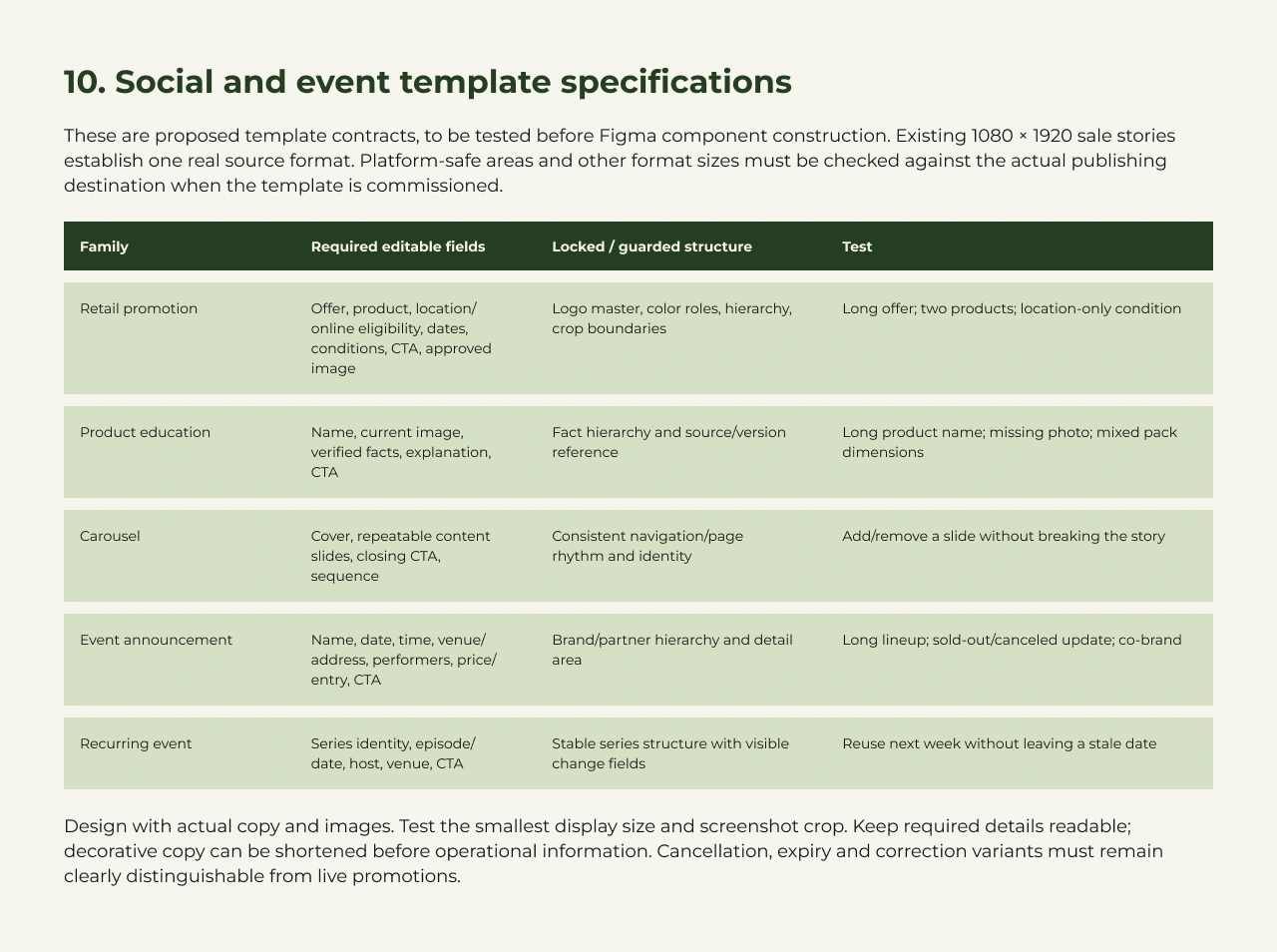
The same distinction applies to composition. An event announcement needs a title, date, venue, details and a call to action. Those content relationships can be reused. Their expression can change with the brand, format and amount of information.
The current template proposals make those boundaries explicit: what someone can edit, what needs to stay controlled and which difficult cases the layout must handle.
Carry the decisions across media
The goal is to make the relationship between materials understandable across social, banners, printables, signage, guides and decks.
A recurring event can share its content structure across a story, a web banner, a printed sign and a presentation slide. Each format still needs its own layout, type scale, density and production rules. A phone screen has safe areas and crops; print needs physical dimensions and the correct export specification.
That makes the shared system useful at two levels. It preserves the decisions that should travel, and it names the adjustments that belong to the medium.
The current guides and editable template studies are a way to test those relationships before wider adoption. Long headlines, dense event lineups, missing images and changes such as cancellation or expiry need to be part of that review. A template that works only for the example copy leaves too much design work for the next person.
Give the team a usable home for the assets
The multi-brand asset directory is an implemented example of the same approach.
The three portals share their layout, search, categories and interface components. Each portal takes its identity from brand tokens in CSS custom properties. The structure can improve once, while the brands remain recognizable.
Approved assets used to depend on knowing the right folder or remembering an old link. The directory gives them a searchable home. Administrators can manage brands, categories and links without editing the interface code.
This is one implemented surface. The broader cross-medium system is still being reconciled through the audits; the portal’s shared components don’t mean every print or social template has already been migrated.
Keep approval and adoption visible
The current work includes native editable guides and template proposals for each brand. These are tangible review artifacts, but an editable file and a published team standard are different stages.
I’m keeping the sources, proposed decisions, approved masters and downstream copies distinguishable. A copied template doesn’t automatically inherit later changes. The documentation and tooling need to make its version and approval state visible.
The planned documentation service, Storybook reviews and AD Hub have related jobs: explain the rules, inspect reusable behavior and put approved material into a workflow. Their connection needs to be implemented and tested. It shouldn’t be implied by a diagram or by the fact that all the files exist.
My role is to connect the design decisions to their use: which brand owns the material, which rules apply, what someone may change and where a new decision needs review.
What the system makes possible
The existing portals show how shared structure can support distinct brands. The audits and new guides are extending that approach into the materials used across the business.
The flower-story workflow is one concrete application. I’ve separated its production history, motion exploration and latest review into Automating product drops gave me time to redesign them. It shows how a reusable design can become a repeatable output.
The work here is the wider brand relationship: keeping the identities distinct, bringing their foundations into a coherent system and making that system useful wherever the brand appears.